How to make AI UGC videos with a consistent creator: 8 videos, every prompt
How we built Mia, an AI UGC creator for a fictional matcha brand, and made eight UGC videos with her in Seedance 2.5. Every prompt, the three references behind them and what each step cost.

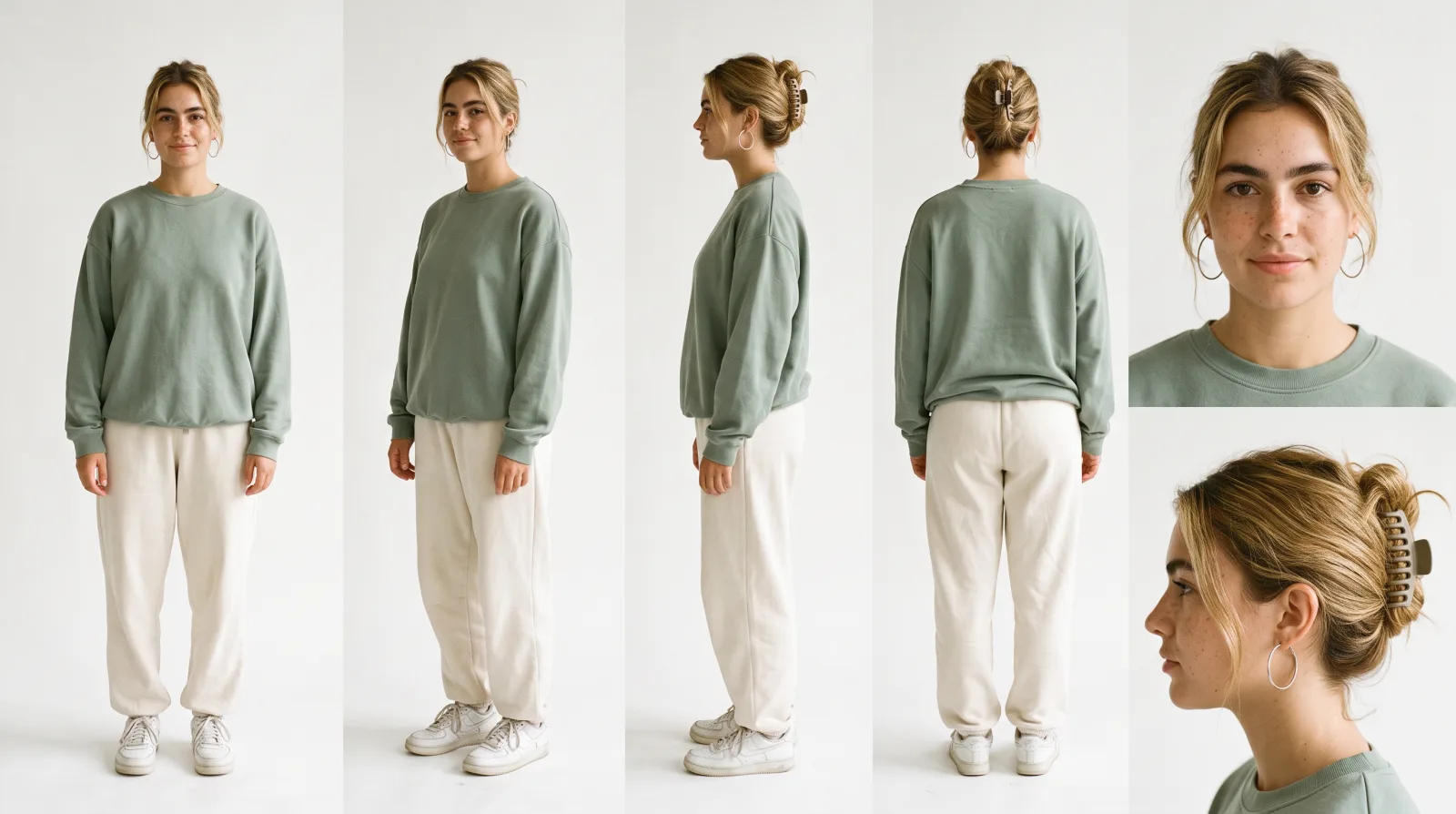
To keep the same creator, product and voice across AI UGC videos, generate every video from the same three references: a character sheet of the creator, a clean photo of the product and a short voice sample. Then change only the scene, the format and the lines. We did this for kiri, a fictional matcha brand: we built an AI creator called Mia and made eight UGC videos with her in Seedance 2.5, inside Endless.
This guide has every prompt and reference, in the order we ran them, and what each step cost in credits.
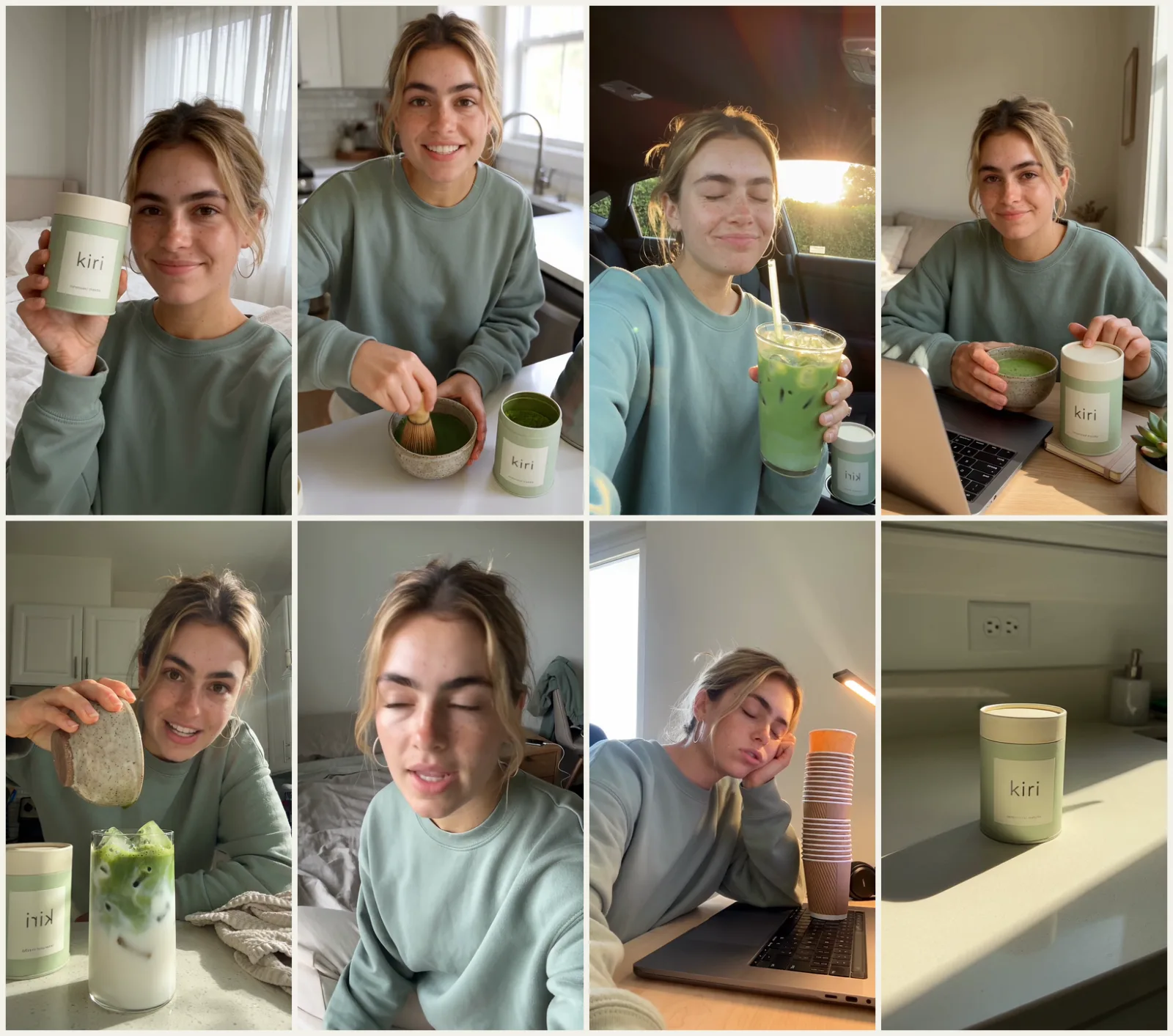
Each frame comes from a different video. Every clip in this post is Seedance 2.5 output with no editing.
The brief
kiri is a ceremonial matcha sold in a pale-green tin. The brand is fictional. The goal was a steady supply of UGC for Reels and TikTok that looks native to those feeds, without booking a creator for every idea.
It had to be the same creator, voice and product in every video, so the account reads as one real person who uses the product.
How do you keep an AI UGC creator consistent?
Lock the creator and the product, and change only the format. All eight videos below were generated from the same character sheet, product photo and voice sample.
| What | Model in Endless | Why |
|---|---|---|
| Creator (character sheet) | Nano Banana 2.1 | Mia's face and outfit from every angle |
| Product shot | Nano Banana 2.1 | A clean, readable "kiri" label to reference |
| Voice | ElevenLabs v4 | A voice sample Seedance can copy |
| Every video | Seedance 2.5 | Talking UGC with lip-sync, B-roll and several shots |
Step 0: pick the formats from real data
Checking what already gets saves in your niche tells you which formats are worth spending credits on. Before generating anything, we used Endless to scan accounts in the wellness, matcha and UGC space, see what was trending and check which hooks were getting saves and comments. This is the prompt we used in the Endless chat:
The answer shaped the whole set. These formats come up again and again in this niche, and they are the ones we built:
| Format | Hook we used | Why it works |
|---|---|---|
| Talking-head recommendation | "Okay, I'm obsessed with this matcha." | It sounds like a tip from a friend |
| How-to | "If your matcha is clumpy, you're stirring it." | It corrects a common mistake, so people save it |
| Confession | "Okay. Small confession…" | A small, honest admission builds trust |
| Before and after | "This is me at 3 p.m. on my fourth coffee." | A familiar problem first, then the product fixes it |
| Moments of the day | Kitchen, car, desk | It shows the product in a real routine |
Step 1: create the creator with a character sheet
A character sheet shows Seedance Mia's face from every angle, so her face stays the same in every video.
Model: Nano Banana 2.1, 16:9, 2K.
We used a sheet instead of a single selfie because it shows her from the front, the side and the back. With those views, Seedance keeps her identity when she turns, looks down at the counter or is filmed from another angle.
Two casting tips:
- Describe an ordinary person, not a model. Use details like freckles, a messy updo and an oversized sweatshirt, and avoid words like "flawless", "stunning" and "perfect skin".
- Pick one outfit and keep it in every video. It works as part of her identity.
Step 2: make a clean product reference
Video models are bad at inventing text, so a clean product photo is what keeps the label right in every clip.
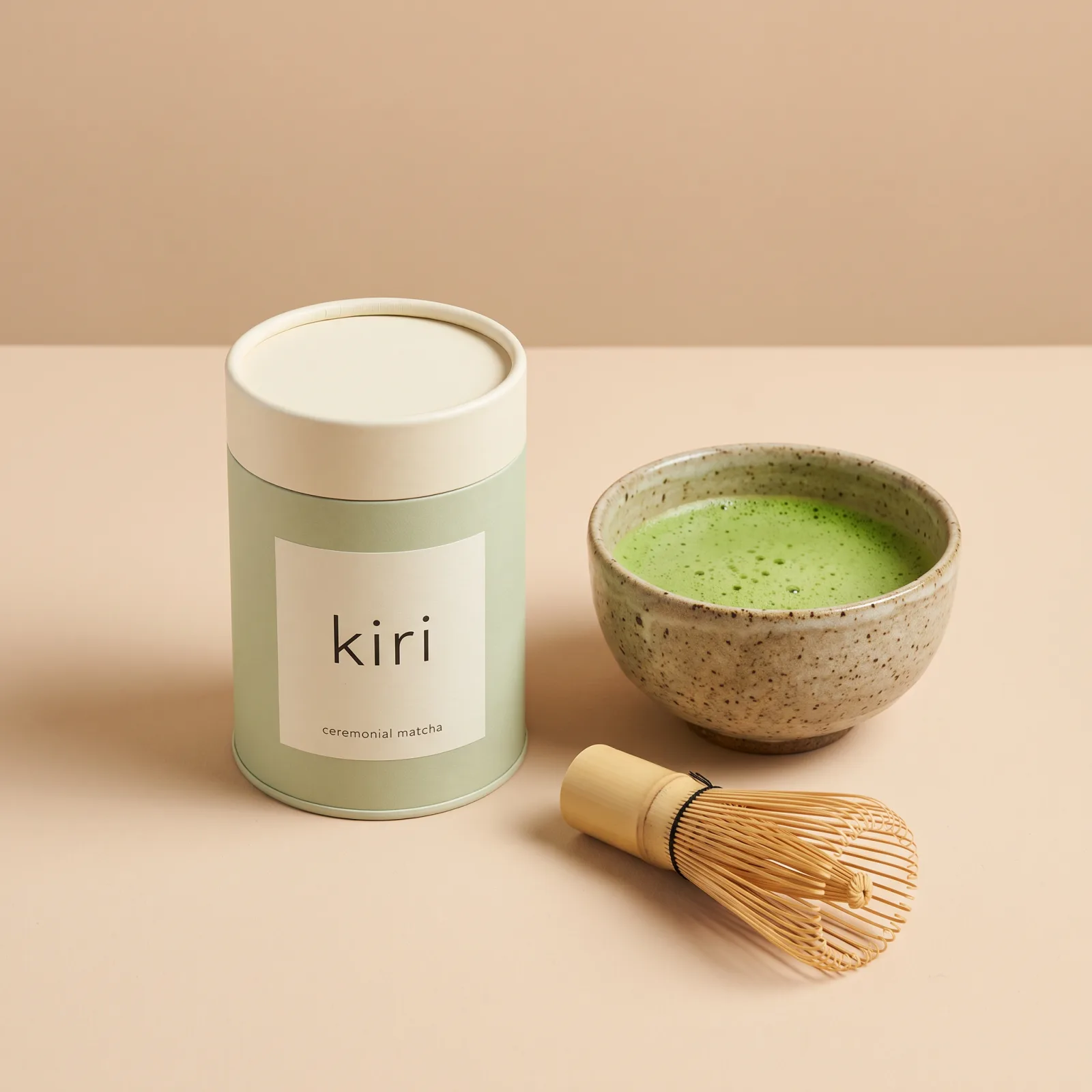
Model: Nano Banana 2.1, 1:1, 2K.
With a real brand, skip this step and upload your own product photo.
Step 3: record a voice reference
A voice reference keeps Mia sounding like the same person across all eight videos.
Model: ElevenLabs v4, voice "Sarah". You can make the same kind of clip with text to speech.
This audio is never posted. It goes into every Seedance prompt as a voice
reference, @audio1. Seedance copies its timbre and rhythm and says new lines
in that voice.
Step 4: generate the videos with Seedance 2.5
How should you structure a Seedance UGC prompt?
Seedance gives more weight to what comes first, so the order of the blocks matters. Every prompt here uses the same blocks in this order:
opening line → CHARACTER → PRODUCT → ENVIRONMENT → VOICE → TIMELINE → LIP SYNC → PHYSICS → CAMERA → LIGHTING → STYLE + NEGATIVES → SOUND
Three rules made the biggest difference:
- Bind each reference to a role. Write "MIA corresponds to @image1, use only her face, hair and outfit, do not use the sheet's background" instead of "use these images".
- Put the action before each line, and write emotion as something you can see: "glances away, then back at the lens, half-smile: {line}". Avoid "she says happily".
- Put dialogue in
{}, and name the language first ("natural conversational American English").
To make a clip look filmed on a phone, describe the camera and the footage in the prompt: phone front camera, handheld at arm's length, slight wide-lens distortion, raw unedited phone footage, no ring light, no beauty filter, no color grading. 480p also looks more like a real phone than higher resolutions, and it costs less.
Format 1: talking-head recommendation
This is the main video of the set: Mia recommends the matcha straight to the camera, the way a friend would.
Seedance 2.5, 9:16, 8 s, audio on. @image1 is the character sheet, @image2
the product photo and @audio1 the voice reference.
Format 2: moments of the day
Short clips in a kitchen, a car and at a desk show the product as part of a daily routine. They use the same references and the same prompt structure. Only the scene and the line change:
| Clip | Scene | Line |
|---|---|---|
| Kitchen | Kitchen counter: scoop, kettle, whisk | "Two scoops, hot water, whisk, and that's it." |
| Car | Parked car, morning sun, iced matcha | "Honestly, the best part of my morning." |
| Desk | Desk, laptop, a bowl of matcha | "I don't even miss coffee anymore." |
These short clips are good for testing: one idea, one line, 5 to 8 seconds.
Kitchen:
Car:
In the car clip, the word "kiri" on the tin in the cup holder reads backwards. The same thing happens in the confession, how-to and before-and-after videos below. Front-camera framing can mirror text like this. The fix is in the table of checks near the end of this guide.
Desk:
Format 3: confession (15 s)
A small, honest admission builds trust. This is the full prompt with every block in order, so it also works as the template for the other formats.
Format 4: how-to (15 s)
A how-to that corrects a common mistake is the kind of video people save.
It uses the same CHARACTER, PRODUCT and VOICE blocks as the confession. These are the parts that change:
Format 5: before and after (15 s, one hard cut)
A before-and-after video shows a familiar problem first and the product as the fix second.
Seedance can cut inside a single generation. Write the cut on the timeline and repeat "same framing, same clothes, same light" so nothing changes across it.
Format 6: product B-roll (no face)
A clip without a face gives you product shots to cut into any of Mia's videos.
Seedance 2.5, 15 s, audio off, with only the product photo as a reference.
The sleeves are the same sage green as Mia's sweatshirt, so the hands read as hers.
What to check before you post
Look for these problems in every clip before it goes out:
| Problem | What to do |
|---|---|
| A brand name or product word sounds wrong | Give Seedance the full script as context, spell the word the way it sounds, and regenerate only that clip |
| The label reads backwards | Front-camera framing can mirror text. Regenerate with "label reading correctly left to right" |
| The label drifts or warps | Always attach the clean product photo and write the exact label text in the prompt |
| The face changes from one video to the next | Never generate a recurring creator from text alone. Reuse the same character sheet every time |
| The acting looks stiff | Replace adjectives with things you can see: glances, shrugs, half-smiles, fingers counting |
How much do AI UGC videos cost?
These are approximate Endless credits for the whole set:
| Item | Credits (approx.) |
|---|---|
| Character sheet and product photo (Nano Banana 2.1, 2K) | ~26 |
| Voice reference (ElevenLabs v4) | ~8 |
| 4 short talking videos, 5 to 8 s (720p) | ~900 |
| 3 videos of 15 s: confession, how-to, before and after (720p) | ~1,290 |
| Product B-roll, 15 s (720p) | ~430 |
At 480p, Seedance costs about 13 credits per second, under half the 720p rate above. For phone-style UGC, 480p also looks more native.
Checklist
- Scan your niche in Endless for formats, hooks and what gets saves.
- Make one character sheet and reuse it in every video.
- Make one clean product photo, and write the exact label text in the prompt.
- Record a voice sample of about 10 seconds and attach it as
@audio1, voice only. - Keep the prompt blocks in order, put the action before each line and write emotion as visible behavior.
- Before posting, check that the face is the same, the label reads correctly and the words are right.
- Test formats with 5 to 8 second clips, then make 15-second versions of the ones that work.
You can run every step of this, from the niche scan to the last video, in Endless.
FAQ
What is AI UGC?
AI UGC is user-generated-style video made with AI models instead of a filmed creator: a person talking to a phone camera about a product, or using it. In this case the creator, the product photo, the voice and all eight videos were generated in Endless.
How do you keep the same face across AI UGC videos?
Generate a character sheet of the creator once, with front, three-quarter, side and back views and face close-ups, and attach it to every video prompt. In the prompt, bind it to a role: "MIA corresponds to @image1. Use only her face, hair and outfit." A recurring creator generated from text alone changes from video to video.
Which AI model makes UGC videos with lip-sync?
All eight videos in this guide were made with Seedance 2.5. It generates talking videos with lip-sync, product B-roll, and several shots or a hard cut inside a single generation.
How do you keep the AI creator's voice the same?
Make one short voice sample, for example with ElevenLabs v4, and attach it to
every Seedance prompt as @audio1. Mark it as voice only and add "Do NOT repeat
its words". Seedance copies the timbre and rhythm and says the new lines in that
voice.
Why does the product label read backwards?
Front-camera framing can mirror text. Regenerate the clip with "label reading correctly left to right" in the prompt, attach the clean product photo and write the exact label text.
How much does one AI UGC video cost in Endless?
At 720p, each 15-second video in this set cost about 430 credits, and the four short talking videos of 5 to 8 seconds cost about 900 credits together. At 480p, Seedance costs about 13 credits per second. All figures are approximate.
Can I use a real product instead of a generated one?
Yes. Skip the product step and upload your own product photo. A clean photo with a readable label, plus the exact label text written in the prompt, keeps the label right in every clip.
Keep reading
The best Krea alternatives in 2026: features, pricing and limits
FLORA, Magnific, Leonardo, OpenArt, Higgsfield, Midjourney and Endless: what each one does differently from Krea, who it suits, what it costs and where it falls short.
Higgsfield pricing in 2026: plans, credits and what they buy
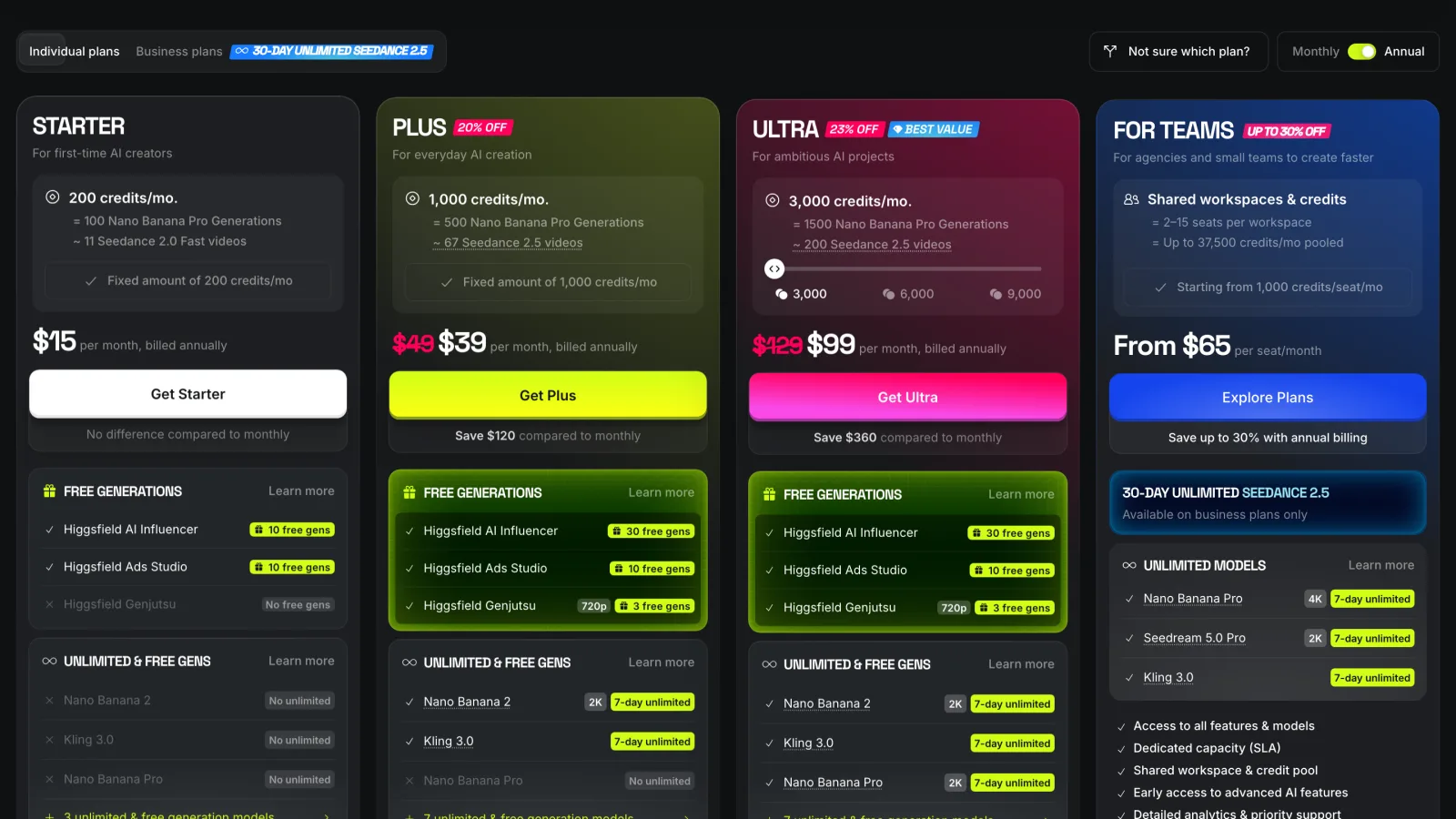
Higgsfield's Starter, Plus, Ultra and team plans in October 2026, what a credit buys in images and video, and how monthly and annual prices differ. Every price links to Higgsfield's pricing page.
The best ChatGPT alternatives in 2026 for teams that want more models
Claude, Gemini, Poe, Magai, TypingMind, OpenRouter and Endless: which ones give you models from more than one company, how they bill a team, and where ChatGPT is still the better choice.
Bring this to your team
Start creating with Endless: chat, image, video, transcripts, and social insight in one workspace.
Start free