Radar social
Pregúntale a Radar qué está pasando ahora en redes sociales y en la web, recibe un informe con fuentes citadas y sigue las tendencias sin salir del chat.
Radar social es una sola pantalla: un compositor, un control para elegir cuánto tiempo atrás mirar y hasta cuatro temas que son tendencia ahora mismo. Se describe a sí mismo como "Monitoreo en tiempo real en redes sociales y en la web." — y la forma de usarlo es hacer una pregunta.
Lo que recibes no es un tablero. Es un chat: Endless busca en la web en vivo, en X y en Reddit dentro de la ventana que definiste, y después te escribe un informe con un enlace detrás de cada afirmación.
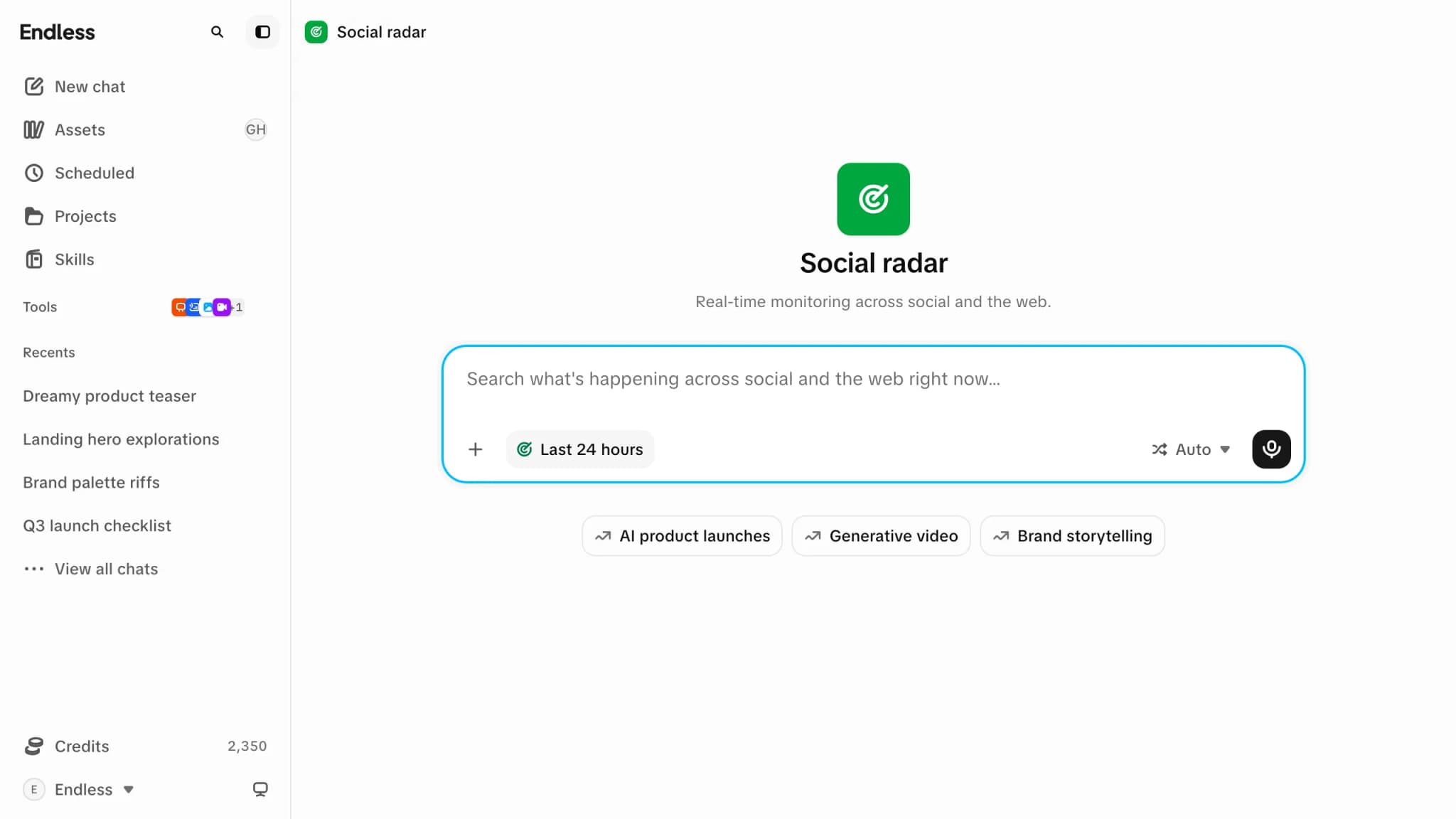
Aquí no se guarda nada y no se hace seguimiento de nada. Radar no tiene listas de vigilancia, ni cuentas monitoreadas, ni gráficos, ni historial propio. Cada pregunta es una búsqueda nueva, y lo único que persiste es la conversación que inicia — que vive en Historial de chat como cualquier otra.
Preguntarle algo a Radar
Empieza por un tema en tendencia, o escribe el tuyo
Las etiquetas debajo del compositor son lo que está en tendencia ahora mismo. Selecciona una y escribe el prompt por ti — el tema más "qué lo está impulsando ahora mismo en X y en la web" — que después puedes editar. O ignóralas y escribe tu propia pregunta; el texto de ejemplo del compositor es "Busca qué está pasando ahora mismo en redes sociales y en la web…"
Define cuánto tiempo atrás mirar
El control del compositor se llama "Recencia en tiempo real" y ofrece "Últimos 30 minutos", "Última hora", "Últimas 8 horas", "Últimas 24 horas", "Últimos 7 días" y "Últimos 30 días" — más "Desactivado". La página abre en "Últimas 24 horas", y el botón muestra la ventana en la que estás.
La ventana es el sentido entero de esta pantalla: es lo que impide que Endless responda con lo que ya sabía y lo obliga a ir a mirar.
Acota las fuentes, si quieres
Con la recencia activada, el mismo menú trae una sección "Fuentes" — Web, X y Reddit. Las tres están activadas salvo que digas otra cosa, y no puedes desactivar la última. Desactiva algunas y sus marcas aparecen en el botón para que veas de un vistazo dónde estás buscando.
Envíalo
Al enviar, todo pasa a un chat nuevo, que hace la búsqueda y escribe ahí la respuesta. Elegir "Desactivado" en el menú de recencia antes de enviar convierte a Radar en un prompt de chat común.
Qué llega de vuelta
Lo más reciente primero
El informe abre con las novedades más nuevas y de mayor señal, y las agrupa por tema, en vez de repetir el contexto que ya tienes.
Con fuentes, no afirmaciones sueltas
Cada afirmación lleva el enlace del que salió — la publicación o el artículo — y todo lo que no esté confirmado o sea un rumor se marca como tal.
Si la ventana está tranquila, te lo dice
Si pasó poco en el rango que elegiste, te lo dice claramente. Endless no va a ampliar la ventana en silencio para llenar la página — pídele más tiempo si lo quieres.
Como es un chat, puedes seguir: pedir lo mismo acotado a una sola fuente, pedirle que redacte una publicación con lo que encontró, o adjuntar el resultado en otro lado. A partir de ahí aplica todo lo de Chat.
Las etiquetas de tendencias
Hasta cuatro temas, actualizados al llegar, para la región desde la que parece venir la solicitud. No hay selector de región — se detecta por ti.
Cuando no se puede llegar a las tendencias en vivo, Radar no disimula. Recurre a un puñado de temas sugeridos, los dibuja distinto y los etiqueta: "No se pudieron cargar las tendencias en vivo - tema sugerido, no en vivo." Siguen siendo prompts perfectamente buenos — solo que no son evidencia de nada.
Radar sin salir de tu chat
Radar no es solo una página. Escribe @radar en el compositor de un chat común — aparece como
"Radar social", "Informe en tiempo real" — y el mismo control de recencia aparece en ese
compositor, listo en las últimas 24 horas. Quita la mención, o elige "Desactivado", y el
control se va de nuevo.
Menciones
Cómo funciona @ y qué más puede traer a un prompt.
Dictado
El compositor de Radar también tiene micrófono — di tu pregunta en vez de escribirla.
Un prompt de Radar a medio escribir se conserva si te vas y vuelves, así que puedes ir a buscar otra cosa a mitad de una idea sin perderla.
Cuánto cuesta
Una pregunta a Radar es una conversación, y se cobra como tal: la respuesta muestra su propio costo, y las búsquedas que hace son pasos pagos con su propio precio indicado en el paso. Una ventana amplia en las tres fuentes es más trabajo que una angosta. Consulta Créditos y gasto.
Si Radar no está
Radar es una de las funciones que un espacio de trabajo puede desactivar, para todos, para un equipo o para una persona. Donde está desactivado no hay entrada en la barra lateral y un enlace guardado te deja de vuelta en el inicio del espacio de trabajo. Consulta Disponibilidad de funciones.