Actividad
Un solo feed con lo que hizo el espacio de trabajo, filtrable hasta una persona, una semana o un tipo de trabajo.
Configuración → Gobernanza → Actividad es el feed único del espacio de trabajo: "Todo lo que hizo el espacio de trabajo: generaciones, colaboración, cambios administrativos y movimientos de créditos, en un solo lugar."
Es una sola lista, en orden cronológico, que junta cosas que antes vivían en lugares distintos. No hay una segunda página de "historial" que revisar: las generaciones, las subidas, los chats, los Canvas, los proyectos, los equipos, las invitaciones y los movimientos de créditos llegan todos aquí.
Para abrir esta página se necesita el permiso de ver la actividad y la gobernanza del espacio de trabajo: un administrador, por defecto. Los miembros, los lectores y los gestores de facturación no ven la sección de Gobernanza en el menú de configuración. Consulta Roles y permisos.
Ver el feed no significa ver dentro de todo lo que aparece en él. Un evento sobre un chat, un Canvas o un recurso que no puedes abrir aparece igual, pero sin su título, y el prompt de una generación solo lo ve quien la ejecutó. Los eventos de proyectos, y los de "le dio acceso a … a …", aparecen solo para lo que puedes abrir.
Cómo se ve una fila
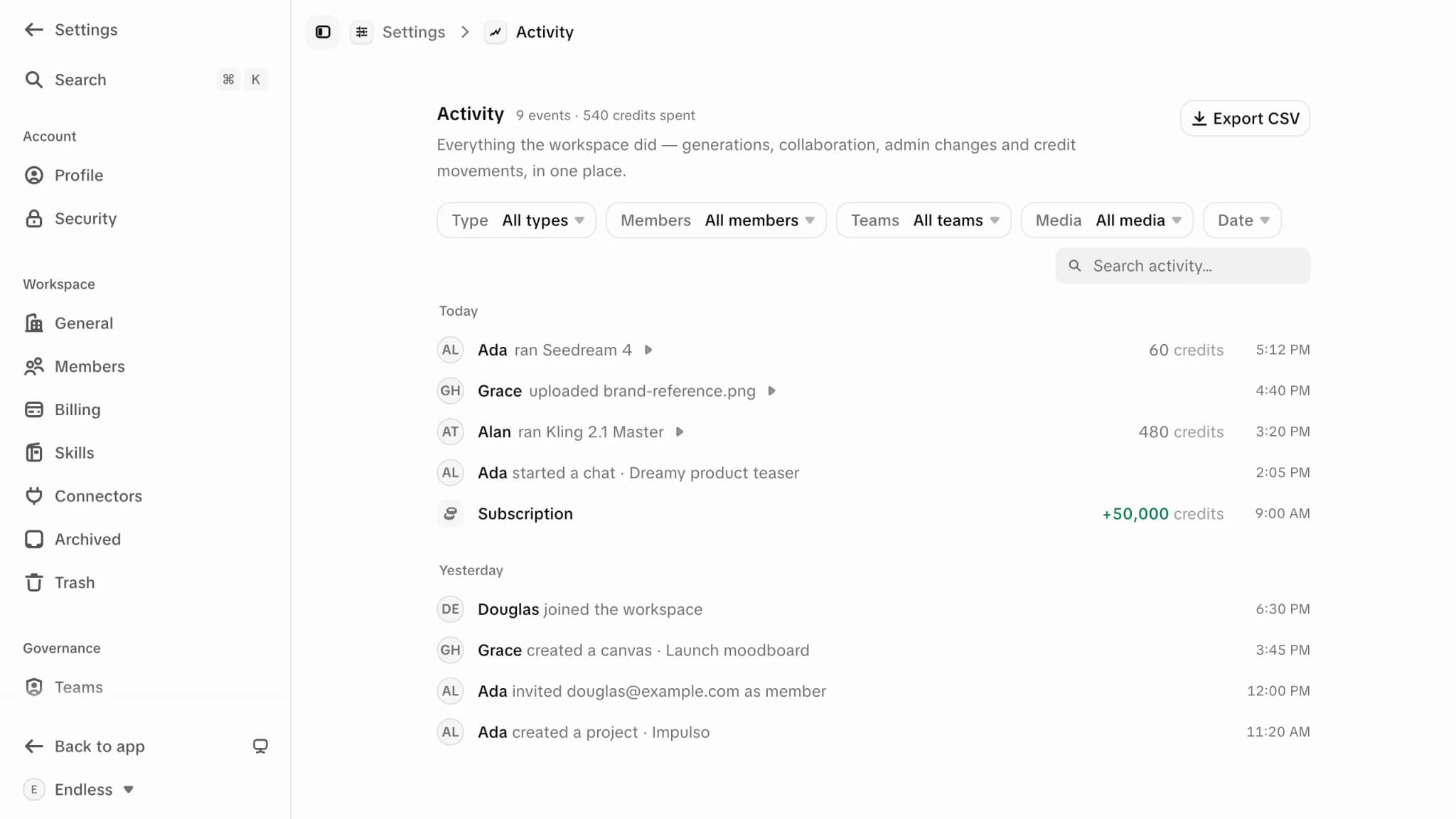
Las filas se leen como frases, no como líneas de registro: alguien ejecutó un modelo, alguien subió archivos, alguien creó un proyecto, el espacio de trabajo recibió una recarga de créditos. La repetición se agrupa: diez variantes de una misma ejecución son una sola fila, y un lote de subidas se cuenta en vez de listarse, así una tarde ocupada no entierra un cambio de rol.
Al expandir una fila, el detalle se carga debajo: para una generación, el modelo, el estado, el costo, la duración, las salidas con su formato y sus dimensiones, y un enlace al chat o al Canvas del que vino. Nada se carga hasta que la abres, así que el feed en sí se mantiene rápido.
El encabezado mantiene un resumen de lo que estás viendo: cuántos eventos y cuántos créditos se gastaron en ellos. Filtra por una persona y por la semana pasada para ver sus eventos y su consumo de créditos durante ese periodo.
Filtros
Tipo
Cuatro grupos — Generaciones, Contenido, Créditos y Miembros. Contenido cubre recursos, chats, Canvas, proyectos y conectores, además de a quién se le dio acceso a qué; Miembros cubre incorporaciones, invitaciones y cambios de equipo.
Miembros y equipos
Acota a personas específicas. Cuando el espacio de trabajo ya tiene equipos, aparece un filtro de Equipos al lado que resuelve a quienes estén en ese equipo en este momento.
Medios
Imagen, Video, Audio o Texto, para las filas de generaciones y recursos.
Fecha
Todo el tiempo, Últimas 24 horas, Últimos 7 días o Últimos 30 días.
Junto a los filtros hay un buscador ("Buscar actividad…") que coincide con prompts, títulos, nombres y etiquetas. Todo se aplica sobre el historial completo del espacio de trabajo, no solo sobre las filas que ya están en pantalla, y el feed carga más a medida que bajas.
Al hacer clic en el nombre de una persona en una fila, el feed se enfoca en ella. Al hacer clic otra vez en el mismo nombre, se limpia. Es la forma más rápida de responder "qué ha estado haciendo esta persona" sin tocar la barra de filtros — y tus filtros viven en la dirección de la página, así que una vista filtrada es un enlace que puedes enviarle a otro administrador.
Cuando los filtros no coinciden con nada verás "Ninguna actividad coincide con estos filtros."; un espacio de trabajo realmente tranquilo verá "Aún no hay actividad. Aquí aparecerán las generaciones, la colaboración y los cambios administrativos."
Exportar
"Exportar CSV", arriba a la derecha, descarga lo que estás viendo en ese momento: una fila por evento con su fecha y hora, categoría, acción, quién lo hizo, la frase de resumen, el estado, el tipo de medio, los créditos y el prompt. Está deshabilitado cuando el feed está vacío.
La exportación cubre los eventos cargados en la vista, así que baja para traer más antes de exportar un periodo largo, y usa el filtro de fecha en vez de asumir que tienes todo. Para una respuesta contable, y no operativa, Configuración → Facturación es la autoridad sobre lo que realmente se cobró.
Qué es y qué no es este feed
Refleja el espacio de trabajo tal como está hoy
El feed se construye a partir del contenido actual del espacio de trabajo, no de un registro aparte a prueba de manipulaciones. Responde muy bien a "qué está pasando aquí". No es un archivo de cumplimiento, y no es el lugar para demostrar cómo se llamaba algo antes de que lo renombraran.
Eliminar reescribe la fila
Manda algo a la papelera y deja de aparecer como "creado" y empieza a aparecer como "eliminado". Restáuralo y el evento de creación vuelve. Elimínalo de forma permanente y desaparecen los dos.
Vale la pena conocer ese último comportamiento antes de confiar en el feed para una auditoría. Eliminar un elemento de forma permanente borra su rastro del feed además de sacarlo del espacio de trabajo — la ventana de 30 días de la papelera es lo único que hay entre ambas cosas, y Papelera lo explica.
Dónde más aparece la actividad
El mismo feed, acotado a una persona, es la pestaña Actividad de su perfil: selecciona su fila en Configuración → Miembros. Son las mismas filas y el mismo detalle, filtrados a esa persona. Cualquiera puede abrirlo. Sin el permiso de ver la actividad del espacio de trabajo, los recursos, chats y Canvas que aparecen son solo los que puedes abrir, y sus movimientos de créditos e invitaciones no se muestran.
Créditos y gasto
De dónde vienen los movimientos de créditos de este feed, y quién puede gastar qué.
Equipos y límites
El gasto desglosado por equipo, con un tope que sí puedes fijar.
Miembros
La lista de personas, con el uso de cada una en este ciclo frente a su límite.
Roles y permisos
Quién puede abrir esta página, y por qué la supervisión es un permiso distinto al de cambiar cosas.
Equipos y límites
Agrupa a los miembros en equipos, limita cuántos créditos puede gastar cada equipo y revisa en qué se gastaron, sin tocar el saldo personal de nadie.
Disponibilidad de modelos
Decide qué modelos de IA puede usar tu espacio de trabajo, un equipo o una persona. Medios y chat son catálogos separados, y cada nivel solo restringe.