Papelera
Los archivos eliminados esperan 30 días antes de desaparecer para siempre — aquí está cómo recuperar uno y cómo borrarlo ya.
Configuración → Espacio de trabajo → Papelera guarda lo que eliminaste, y la regla está en la propia página: "Los elementos de la papelera se eliminan automáticamente después de 30 días. Restáuralos antes de ese plazo para conservarlos."
Cualquier miembro puede abrirla. Esta página no tiene permisos: enumera solo los elementos eliminados que creaste tú. Algo que hizo y eliminó un colega nunca aparece aquí, aunque te lo hubiera compartido.
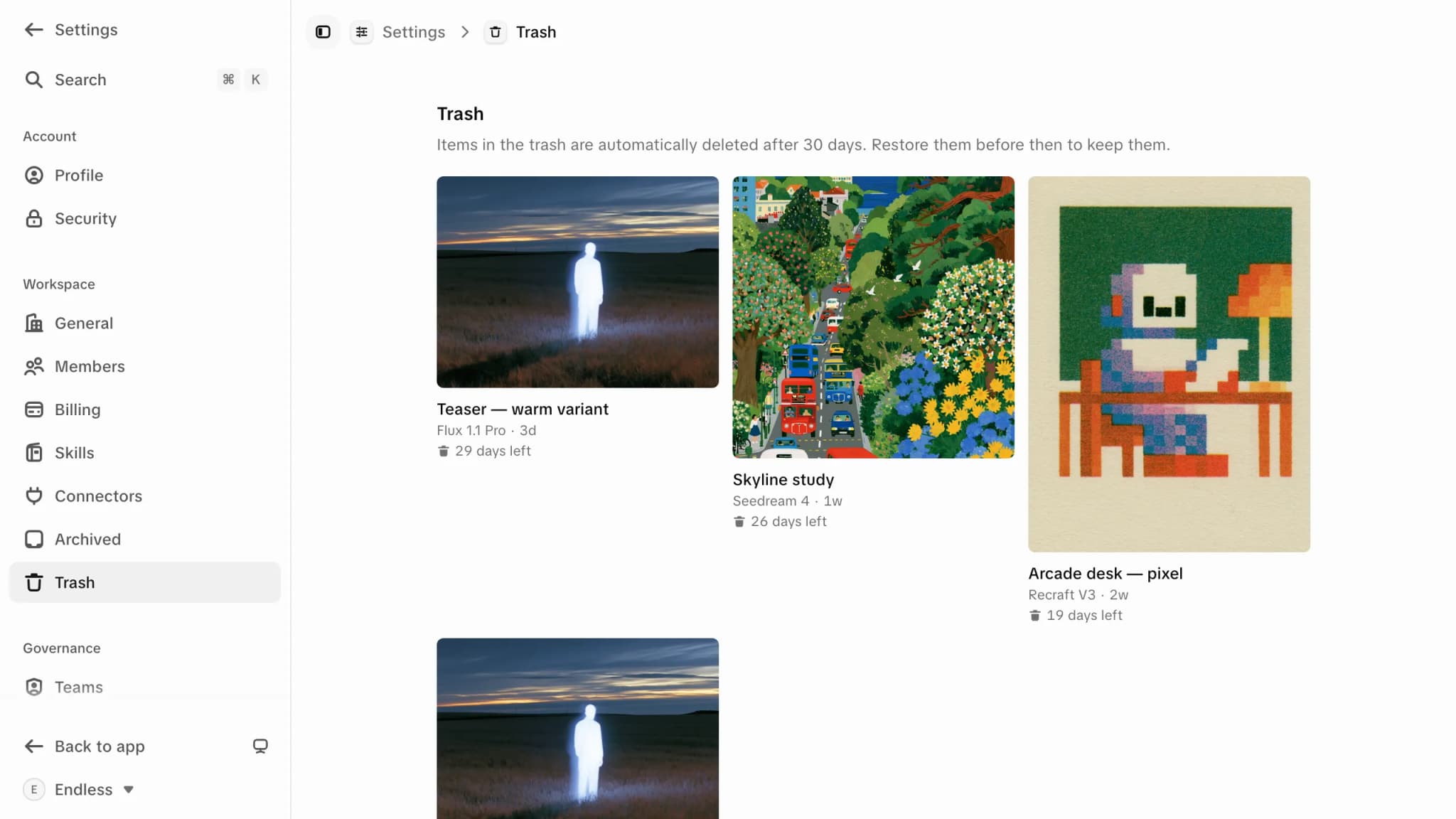
30 días, y después es permanente. Pasado ese plazo, el elemento y el archivo detrás de él se eliminan para siempre, de forma automática, sin más aviso y sin vuelta atrás. El estado vacío lo dice igual: "Los elementos eliminados aparecen aquí durante 30 días antes de eliminarse definitivamente."
Qué termina aquí
Biblioteca — todo lo multimedia
Archivos subidos, imágenes generadas, video y audio, documentos, texto y transcripciones. "Mover a la papelera" en cualquier parte de Biblioteca deja el elemento aquí.
Las conversaciones no
Un chat eliminado no aparece en esta página, y no hay forma de recuperarlo desde la app — el diálogo te avisa que no se puede deshacer. Consulta Historial de chat.
Los proyectos son un tercer caso: un proyecto eliminado tampoco aparece aquí, y no se puede restaurar desde la app. Si quieres sacar un proyecto de la vista pero poder recuperarlo, archívalo — consulta Proyectos archivados.
Restaurar algo
Selecciona lo que quieres de vuelta
La papelera es una cuadrícula de fichas. Selecciona una y entras en modo de selección; sigue seleccionando para armar un lote. Abajo aparece una barra con la cantidad.
Presiona "Restaurar"
Los elementos vuelven de donde salieron, intactos — la misma visibilidad, los mismos vínculos con el chat, el Canvas o el proyecto al que pertenecían. Endless lo confirma con la cantidad de elementos restaurados.
Eliminar algo ahora mismo
La misma barra ofrece "Eliminar para siempre", que se salta la espera de 30 días. Pregunta primero, y la confirmación no deja lugar a dudas: "Esto no se puede deshacer. El archivo y sus datos se eliminan para siempre."
Eliminar para siempre borra también el archivo de fondo, además de la entrada, así que todo lo que todavía apunte a él — un Canvas que usó la imagen, un chat que la mencionó — lo pierde. Restaurar solo es una opción mientras el elemento siga en la papelera.
Quién puede restaurar qué
Para los elementos de esta página, mandar a la papelera y restaurar son acciones solo para quien lo creó, y ningún rol pasa por encima de eso. Puedes restaurar y eliminar de forma permanente los recursos que tú hiciste; un recurso eliminado de un colega no te corresponde recuperarlo ni destruirlo, ni siquiera como administrador. Es la misma regla que rige los recursos en todo Endless — consulta Biblioteca y visibilidad.
Dónde se guarda lo que generas
Qué pasa con una generación entre que el modelo termina y tú la encuentras.
Biblioteca y visibilidad
La regla de los 30 días en contexto, y quién puede ver un elemento en la papelera.
Proyectos archivados
La forma reversible de quitar de la vista un proyecto entero.
Eliminar el espacio de trabajo
La única eliminación que se lleva la papelera con ella.
Facturación
Gestiona tu plan de Endless, el método de pago, las facturas y los paquetes de créditos en la facturación, y qué hacer si no puedes abrir la página.
Proyectos archivados
Encuentra tus proyectos archivados en la configuración, recupera uno en la barra lateral y descubre por qué archivar no libera un cupo de tu plan.