Onde o resultado é salvo
Tudo o que você gera no Endless vira um ativo. Saiba como encontrar cada um de novo, quais detalhes ficam salvos com ele e quem mais pode vê-lo.
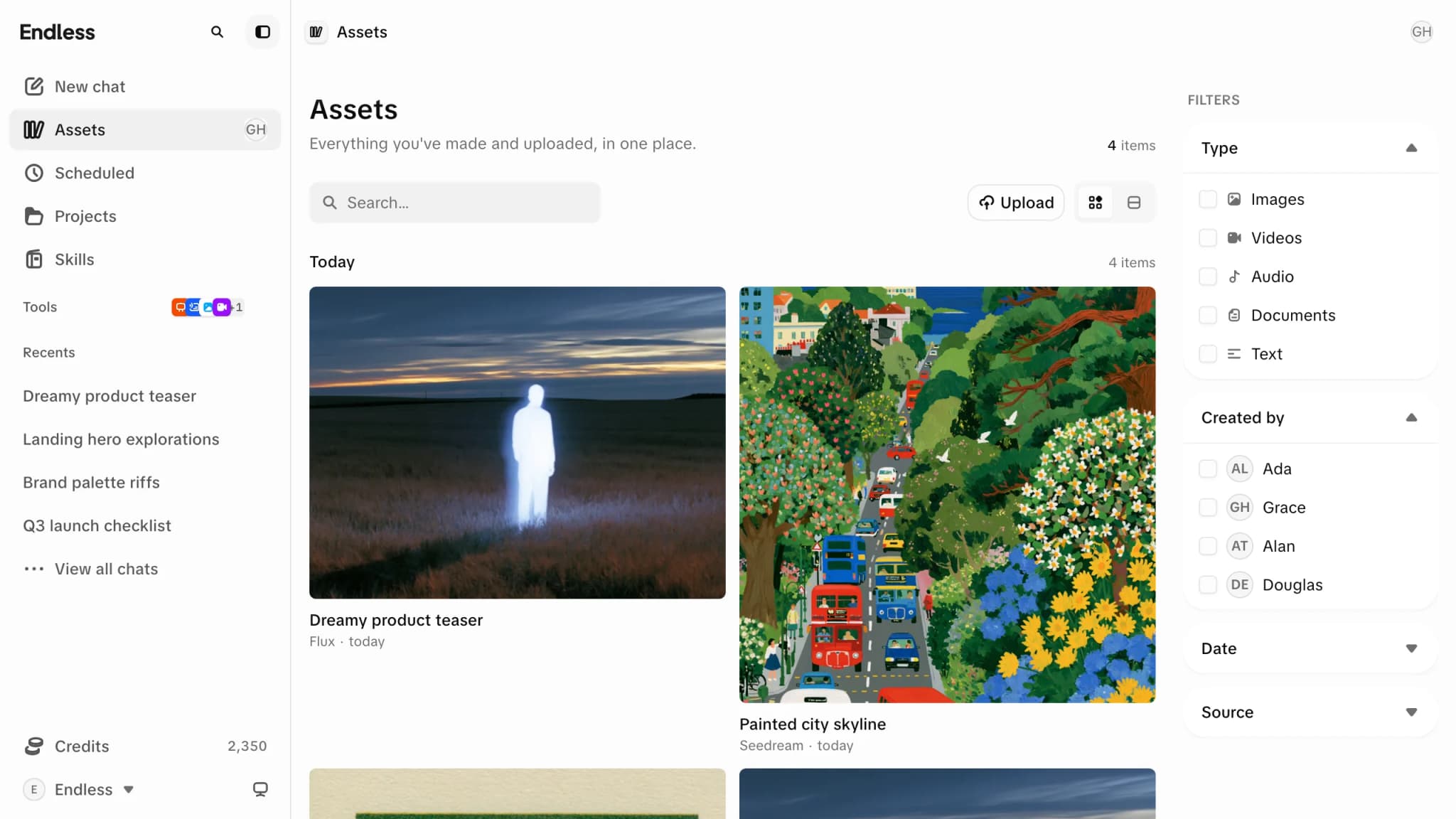
Existe uma biblioteca só, e tudo acaba nela. Uma imagem da página Imagem, um clipe gerado num canvas, uma imagem que o chat fez no meio de uma resposta, um arquivo que você arrastou para dentro — todos são ativos, na Biblioteca, descrita lá como "Suas gerações e arquivos enviados, em um só lugar."
O feed das páginas Imagem e Vídeo e o painel Biblioteca num canvas não são coleções separadas. São visões da mesma biblioteca, filtradas.
Uma biblioteca vazia avisa e oferece as duas portas: "Envie arquivos ou gere conteúdo e eles vão aparecer aqui."
Encontrando algo de novo
Busque
Um ativo gerado recebe o nome do prompt que o fez, então digitar uma frase que você lembra ter escrito costuma encontrá-lo. A busca também alcança o interior de textos e documentos, não só os títulos.
Reduza com os filtros
O painel de filtros traz Projetos, Tipo — imagens, vídeos, áudio, documentos, texto, transcrições —, Criado por, Data, Origem e Modelo. Origem é o filtro que as pessoas esquecem: ele separa o que foi gerado do que foi enviado. Modelo restringe ao motor que fez o item.
Ou só role a página
Os ativos aparecem do mais novo para o mais antigo, agrupados por dia — hoje, ontem e assim por diante. Mais itens carregam conforme você chega ao fim.
Os layouts em grade e em lista estão disponíveis, no controle de exibição.
Coisas relacionadas chegam juntas
Gerar ou enviar várias coisas de uma vez reúne tudo num único bloco empilhado com um contador, que você pode abrir para ver os itens. Três coisas empilham:
Uma execução com várias saídas
Peça quatro variações a um modelo e você recebe uma entrada, não quatro blocos soltos.
Um envio de vários arquivos
Soltar uma pasta inteira de imagens mantém todas juntas.
Tudo o que uma conversa fez
Todo ativo produzido num mesmo chat compartilha uma pilha, com o nome do próprio chat — então uma conversa longa aparece como uma pasta na sua biblioteca, em vez de imagens espalhadas.
Você também pode montar uma pilha por conta própria, arrastando um bloco sobre outro, e desfazê-la do mesmo jeito.
O que um ativo guarda
Abra um e o painel ao lado traz como ele foi feito — o prompt (com um botão de copiar), o modelo de IA, suas dimensões, sua duração se for um clipe, a "Origem" e quem o criou.
Se ele veio de uma conversa ou de um quadro, o painel leva de volta até lá: a lista "Aparece em" marca com "Criado aqui" o chat ou canvas onde ele foi feito, e mostra também todo outro chat, canvas e projeto onde ele está e que você consegue abrir — um projeto que o tem por meio de um deles aparece marcado "Por um chat" ou "Por um canvas".
Dali você pode baixar o ativo, abri-lo em uma nova aba, gerá-lo de novo, ou mandá-lo para um chat e continuar trabalhando nele.
Baixar
Salva o arquivo na sua máquina.
Gerar de novo
Roda a mesma configuração outra vez.
Usar no chat
Coloca o ativo numa conversa como anexo.
Quem mais pode ver
Ativos gerados são privados por padrão, exatamente como os envios. Algo que você fez na página Imagem é só seu até você compartilhá-lo ou colocá-lo em algum lugar compartilhado.
Em "Acesso geral" o controle de compartilhamento oferece dois níveis: "Privado" — "Só você, e onde estiver anexado" — e "Espaço de trabalho" — "Todos no espaço de trabalho", com "Pode ver" ou "Pode editar". Além de qualquer um deles você pode adicionar pessoas pelo nome. Não existe link público nem forma de publicar um ativo na internet a partir daqui.
Isso significa que onde você gera decide bastante coisa. Uma imagem feita num chat que você compartilhou, ou num quadro que o espaço de trabalho pode abrir, já está visível para essas pessoas por meio desse chat ou quadro, sem que você compartilhe o ativo em si.
Excluindo
Vai primeiro para a lixeira
Excluir move um ativo para Configurações → Lixeira, em vez de destruí-lo.
30 dias para mudar de ideia
"Os itens na lixeira são excluídos automaticamente após 30 dias. Restaure-os antes disso para mantê-los." Você também pode excluir algo em definitivo, o que pula a espera e não pode ser desfeito.
A Biblioteca é, em si, uma superfície que um espaço de trabalho pode desligar. Onde está desligada, você não encontra a biblioteca na barra lateral — o que você gera continua existindo e continua aparecendo no chat ou no canvas que o fez, mas a navegação e a filtragem descritas aqui não ficam disponíveis para você.