Image
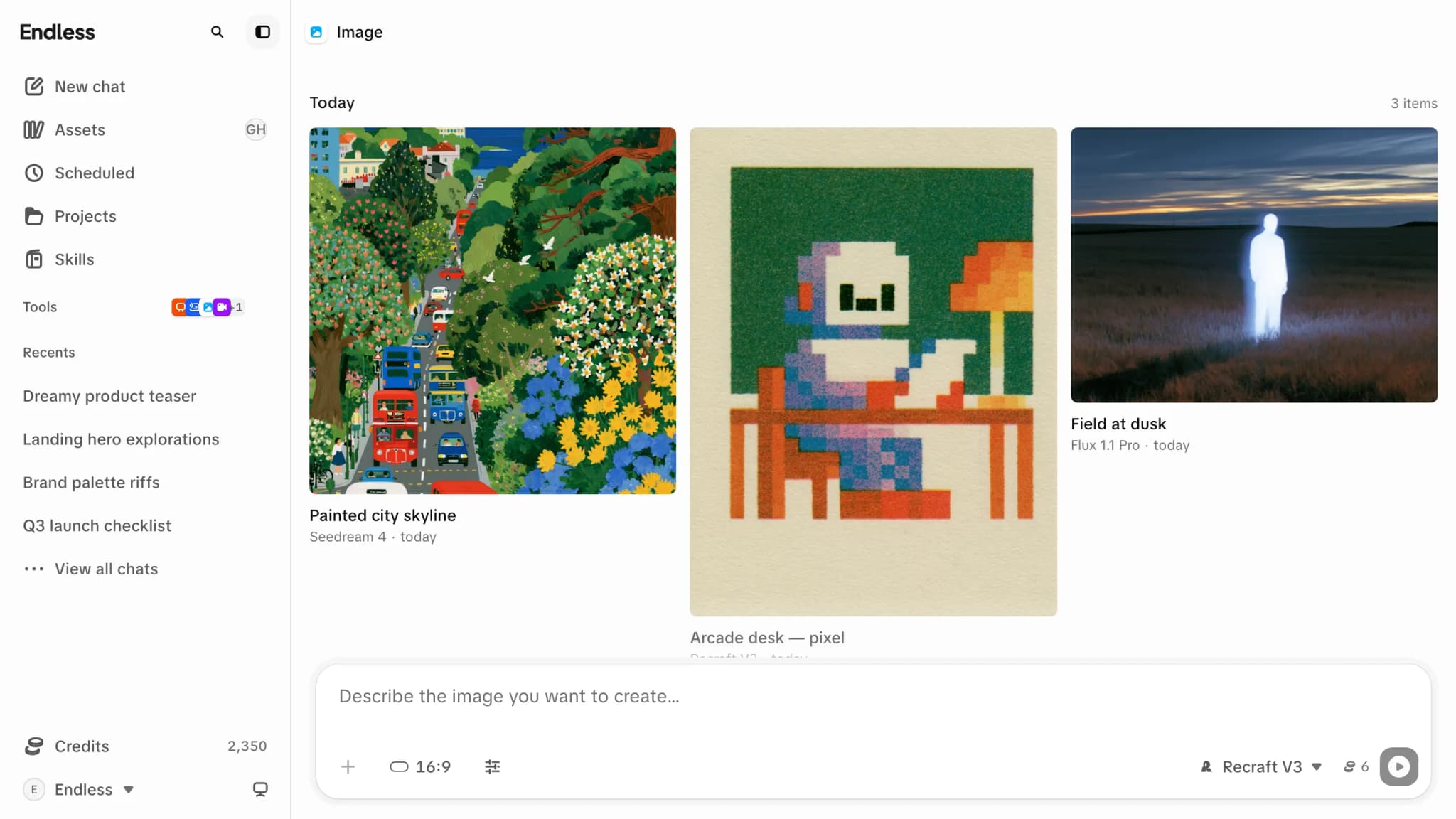
Generate an image in Endless: write a prompt, add reference pictures, set the model's own controls, and see the credit cost before you run it.
Image is a composer and a feed. You set up one run — a model, a prompt, whatever pictures it should look at, and the model's own settings — and press send. The results appear above the composer, and the composer keeps everything you just set so the next run is a small change rather than a fresh start.
It isn't a conversation. Nothing here interprets your request or decides anything for you: what you set is what runs.
Making one
Start from a prompt or an idea card
The prompt field reads "Describe the image you want to create…". Before you've generated anything the page also offers a few starting ideas — picking one drops its prompt into the composer, where you can edit it like your own.
Choose a model, if you have the choice
The model control sits in the composer's footer and it decides everything else on this page. Each row shows the model's name and what a run of it costs. See Models for how to choose between them.
Add references, if the model takes them
The "Add reference" button opens your assets so you can hand the model pictures to work from — an image to edit, a style to follow, a face to keep. You can also paste a picture straight into the prompt field, or drop one in.
Adjust what the model exposes
The output control sets the shape and resolution. "Advanced parameters" opens everything else the model offers, and "Reset all" puts those back to the model's own defaults.
Check the estimate, then send
The number next to the send button is what this run is expected to cost. "Send message" runs it, and a placeholder appears in the feed straight away.
The controls come from the model
This is the thing that surprises people, so it's worth saying plainly: the composer is built from whichever model is selected. Switch model and the settings change — some appear, some vanish, some change their range. Nothing is broken; you're looking at a different engine's control panel.
Some take no references at all
The "Add reference" button stays where it is but goes inert, and says why: "This model doesn't take reference assets". Once its slots are full it says "This model's references are already filled" instead.
Some need a picture before they'll run
An editing model has nothing to edit without one. The empty slot is marked "Required", the button asks for the exact thing — "Add the image this model needs" — and send stays held until you supply it.
Some need no prompt
A model that works purely from the pictures you give it disables the text field and explains itself in its place: "This model only uses the reference images — no prompt needed".
Some have far more settings than others
The "Advanced parameters" toggle only appears when the model has anything to put behind it. Settings that define the run rather than tune it sit above the composer permanently instead of behind the toggle.
Pick more references than the model has room for and Endless fills what fits and tells you what it dropped, rather than refusing the whole thing: "2 files didn't fit this model's inputs".
When a model isn't available to you
Three different situations look similar and aren't:
Visible, but locked to a plan
Plan-gated models stay in the list, dimmed and unselectable, carrying a lock and the name of the plan that unlocks them — "Only available from the … plan". Choosing one takes you to billing rather than switching model — nothing runs and nothing is charged.
Not in the list at all
A model the workspace turned off genuinely disappears — from here, from
chat, and from @ mentions. With everything turned off the control reads
"No models available. Ask an admin to enable one in workspace settings."
No model control on the page
Picking the model is itself a feature a workspace can switch off. When it is, the control isn't rendered and runs use the model Endless has for you.
What it costs
The estimate next to the send button is priced from the same inputs and the same rules the charge uses, so it is usually exactly right. It isn't a promise: it prices the outputs you asked for, while the charge prices the ones that come back.
Some models have no fixed price and are priced from the size or length of what you feed them at each run. In the model list those read "from" a number rather than a flat one. The composer still shows a real figure once your inputs are in place — it just moves as you change them.
A run that fails doesn't cost credits. If the workspace — or your own limit — can't cover the run, Endless refuses before anything starts and points you at what to do about it.
Working from your results
Feed one back in
Select a result and choose "Use as reference" to route it into the current model's reference slots — the fastest way to iterate on something you just made.
Reuse a run's setup
Open a result to see the prompt and model behind it, and regenerate from there.
Everything is saved in Assets
The feed on this page is a view of your library, not a separate one.
When a run fails you get "Couldn't generate. Try again." If image generation has been switched off for your workspace, the refusal is explicit instead: "Image generation isn't enabled for this workspace".